

blueMSX

Quick Links:
Official Homepage
Download
Source Code
blueMSX is an open source MSX
emulator that uses a unique emulation model to achieve the highest
level of accuracy possible. It is available for the Microsoft Windows
operating system. It has been translated into 14 different languages.
blueMSX includes a powerful debugger with support for several assembly
formats and a machine configuration editor that allows advanced users
to set up practically any MSX computer system ever made.
History
Like
many other MSX emulators, blueMSX started as a clone of fMSX in
September 2003. The feature that made the first release, in November
2003, unique to the MSX emulator scene at the time, was the addition of
monitor simulation. This feature made the video output look like an old
TV or a monitor.
Initially, blueMSX's emulation was quite poor
and suffered from the same limitations and flaws as its mother fMSX.
However, the next six months the development focused on improving and
replacing the misbehaving emulation code, as well as redesigning the
software architecture. With better architecture, emulation of new
devices became easier, and wasn't very long before most audio devices
and ROM types were supported.
In August 2004 blueMSX became the first MSX emulator to support skins.
In
November 2004, blueMSX was finally 100% free of fMSX code. The November
release was also a big milestone since it brought support for the
Turbo-R, the last MSX produced. On top of that, it was the first
release that included emulation for the ColecoVision and the Spectravideo SV-328.
Since
the November 2004 milestone, developer focus has been on improving the
user interface and emulation accuracy, as well as extending the
emulation to include more exotic devices such as the Konami Keyboard
Master, an unreleased speech synthesis ROM.
Recently, the emulator has added support for the SG-1000 computer systems and emulation of other systems such as SMS is on the roadmap.
Feature Highlights
The
emulation engine in blueMSX is cycle accurate, which means that the
timing and synchronization between emulated hardware components appear
the same as on a real MSX. The goal is to replicate each individual
component as accurate as possible, which means that the emulator
require a more high end PC than emulators optimized for speed.
Most
hardware released for the MSX system is emulated and the emulator
includes a configuration editor to mimic real MSX systems by choosing
components such as floppy drives, memory, sound chips and video chips.
Several pre-configured machines are available for users that don't want
to build their own machines.
Common emulator features are
supported, like screen shots, AVI rendering, and a cheat system. The
emulator has a theme based GUI with buttons to control the emulation, a
virtual keyboard, and controls to change sound and video settings
runtime.
blueMSX is capable of emulating major sound chips including programmable sound generator (AY-3-8910 SN76489) sound chips, Konami SCC, Moonsound (OPL4), FM-PAC (YM2413),
MSX-AUDIO (Y8950 sound chip) and a couple of different PCM devices. The
volume and pan of each sound chip can be configured in a basic mixer.
blueMSX
simulates six different monitor types, from sharp modern monitors to
old TV sets. The emulator has controls for real time modification of
gamma, brightness, contrast, saturation and color shifting, and it
supports horizontal and vertical stretch, as well as a slider for
adaptable scanlines on all monitor modes to make the ratio of the video
output match a real system. It also supports multiple video sources,
for example an external 80 column card.
blueMSX includes a
graphical debugger with register windows, memory windows, call stack
windows, breakpoints, trace and other features. This makes blueMSX a
good development platform for the supported systems.
fMSX-SDL
Quick Links:
Official Homepage
Download
Source Code
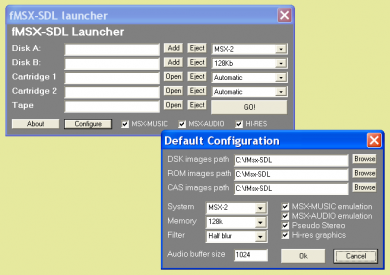
fMSX-SDL is an emulator that stays very close to the emulator it's based on: fMSX.
Basically it adds better music and graphics emulation using SDL (Simple
Direct media Library). The benchmark results show how close fMSX-SDL
stays to its 'mother': they are exactly the same as those of fMSX.
Instead
of a GUI, fMSX-SDL can be operated with a launcher. This adds some
benefits and some downsides to the emulation. One of the major
downsides is there are a couple of things you have to set before you
start running the emulator (e.g. the disks you want to use), which can
be changed during emulation on most GUI-based emulators. Luckily
hotkeys allow you to change the most essential things you'd want to
change during emulation. Another interesting thing about fMSX-SDL is
the fact it only runs in fullscreen mode.
Accuracy
With benchmark results and sourcecode so close to the original fMSX one would expect the same amount of MSX compatibility. This is confirmed by the tests we ran. Strangely, FAC demo 5 does boot and run without any problems, giving fMSX-SDL a 5 point advantage over fMSX. The 20th anniversary demo and Metal Limit performed a bit better than on fMSX as well. The only test that performed below expectations was Vscreen, which responded very slowly.
Music
Accuracy is not the only thing that has been improved compared to fMSX. Although both are accompanied by quite some clicks and other small glitches, the MSX-MUSIC and (in fMSX
unsupported) MSX-AUDIO actually sound like they should in a lot of
songs. The MSX-AUDIO doesn't perform too well when using AM-Synthesis,
which is often used in Dutch scene products and the MSX-MUSIC doesn't
perform too well when it comes to drums and warmth, but it's already a
whole world of difference when compared to the square waves of fMSX.